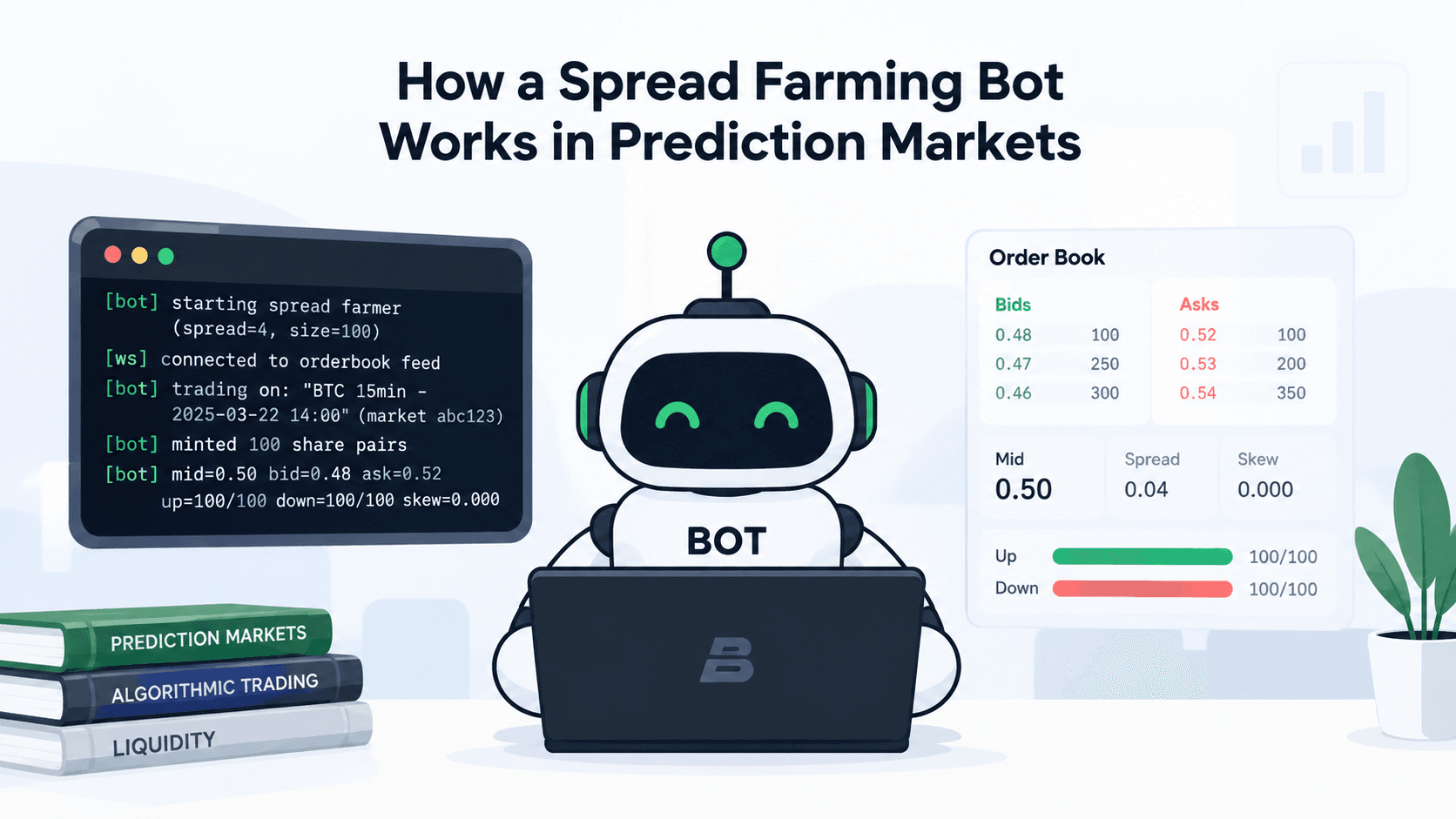
By the end of this tutorial you will have a working bot that quotes both sides of a Bayse prediction market at once, placing a bid below the current mid-price and an ask above it, then earning the spread whenever both orders fill while a set of inventory and risk rules keeps its exposure under control. This is a hands on build, not a strategy overview: you will connect to the Bayse API, stream live orderbook data over WebSockets, mint and burn share pairs to manage inventory, and place and cancel limit orders automatically. Before the code, get your developer access sorted through the Bayse API waitlist and authentication docs, and if you have not yet traded on Bayse manually, it is worth reading how to start trading prediction markets in Africa and prediction markets in Nigeria first, since understanding how a human trader reads a market makes the bot’s logic far easier to follow.
Key Takeaways
- Market-making bots quote both sides of a market at once instead of simply predicting direction, earning the spread between their bid and ask rather than betting on an outcome.
- Spread capture only works with strict inventory and risk controls. Without a position limit and a skew mechanism, one-sided fills can leave a bot dangerously exposed.
- A complete tutorial needs to show the full flow: authentication, market discovery, order placement, inventory management, and monitoring, not just the quoting formula.
Prediction Markets, Explained for Developers
A prediction market lets people trade on the outcome of real-world events, such as whether BTC will be higher in the next 15 minutes, and it works a lot like a traditional exchange. There is an orderbook, buyers and sellers post limit orders, and prices move as opinions shift. A market maker, human or automated, provides liquidity by continuously placing buy and sell orders on both sides of that book, earning the spread between them rather than taking a directional view on the outcome.
In this tutorial, we build a simple market-making bot in TypeScript that connects to the Bayse Markets API, discovers tradable markets, streams live orderbook data over WebSockets, and places spread quotes around the mid-price. Along the way, we cover market discovery, orderbooks, order management, and share minting, which are the core building blocks for any trading bot on Bayse.
Prediction-Market Order Books Explained for Developers
Every outcome on Bayse has its own orderbook: a list of resting buy orders (bids) and sell orders (asks), each sorted by price. The highest bid and the lowest ask define the current spread, and the midpoint between them is the reference price most quoting strategies build from. Unlike a traditional stock exchange, a Bayse outcome’s price is bounded between 0 and 1, representing a probability, and each binary market has two linked outcomes (typically Up/Down or Yes/No) whose prices move inversely: as one side gets bought up, the implied probability on the other side falls. For a bot, this means every orderbook read has to account for both outcomes together, not just the one you are quoting on, since your inventory and risk exposure are shared across the pair.
Prerequisites
To follow along, you will need:
- Node.js version 20 or higher, since the bot relies on native fetch.
- A Bayse Markets account with API credentials: an API key (public key) and a secret key. The Bayse API is currently available through a waitlist, which you can join at bayse.link/api-waitlist. Once approved, generate your key pair from the authentication section of the API documentation.
- Some familiarity with TypeScript and async/await.
Setup
Create a new project folder, initialize it, and install the dependencies:
$ mkdir bayse-spread-farmer && cd bayse-spread-farmer$ npm init -y$ npm install ws$ npm install -D typescript tsx @types/node @types/ws
There is only one runtime dependency, the ws library for WebSocket connections. Everything else, including HTTP calls and the crypto module used for request signing, comes from Node.js built-ins.
Create a tsconfig.json in the project root:
{ "compilerOptions": { "target": "ES2022", "module": "Node16", "moduleResolution": "Node16", "outDir": "dist", "rootDir": "src", "strict": true, "esModuleInterop": true, "skipLibCheck": true }, "include": ["src"]}
Then set up a .env file with your credentials and trading parameters:
# Your Bayse API key pair — get these from https://docs.bayse.markets/authenticationBAYSE_API_KEY=your_public_key_hereBAYSE_SECRET_KEY=your_secret_key_here # Total spread width around the mid-price, in your trading currency.# With NGN (100x multiplier), a spread of 4 means we bid ₦2 below mid and# offer ₦2 above. When both sides fill, we capture the ₦4 difference.SPREAD=4 # Number of shares per order. This is the quantity placed on each side of the book.ORDER_SIZE=100 # Maximum net position (in shares) before we start skewing quotes to reduce exposure.# The closer we get to this limit, the more aggressively we quote to unwind.MAX_INVENTORY=500 # Trading currency. Bayse uses a base multiplier per currency to convert probabilities# into costs — 1x for USD, 100x for NGN. A probability of 0.65 costs $0.65 in USD# or ₦65 in NGN, with winning shares paying out $1 or ₦100 respectively.# See https://docs.bayse.markets/concepts/multi-currency for details.CURRENCY=NGN # Series slug identifying which recurring event series to trade.# This targets the BTC 15-minute binary markets.SERIES_SLUG=crypto-btc-15min # How often (in milliseconds) the bot recalculates and refreshes its quotes.QUOTE_INTERVAL_MS=5000
Configuration
Before we get to the interesting parts, let’s set up a simple config loader. Create src/config.ts:
// Base multipliers per currency — used to convert between currency// amounts and the probability prices (0–1) that the API uses internally.const BASE_MULTIPLIER: Record<string, number> = { USD: 1, NGN: 100,}; export interface Config { apiKey: string; secretKey: string; spread: number; // spread in probability terms (e.g. 0.04) orderSize: number; maxInventory: number; currency: string; seriesSlug: string; quoteIntervalMs: number;} export function loadConfig(): Config { const required = (key: string): string => { const val = process.env[key]; if (!val) throw new Error(`missing env var: ${key}`); return val; }; const currency = process.env.CURRENCY ?? "NGN"; const multiplier = BASE_MULTIPLIER[currency] ?? 1; return { apiKey: required("BAYSE_API_KEY"), secretKey: required("BAYSE_SECRET_KEY"), spread: parseFloat(process.env.SPREAD ?? "4") / multiplier, orderSize: parseFloat(process.env.ORDER_SIZE ?? "100"), maxInventory: parseFloat(process.env.MAX_INVENTORY ?? "500"), currency, seriesSlug: process.env.SERIES_SLUG ?? "crypto-btc-15min", quoteIntervalMs: parseInt(process.env.QUOTE_INTERVAL_MS ?? "5000", 10), };}
The spread is specified in your trading currency, ₦4 for NGN. The config loader divides it by the currency’s base multiplier (100 for NGN, 1 for USD) to convert it into the probability space the API uses internally, so a ₦4 spread on a ₦100 contract becomes 0.04 in probability terms. If the mid-price is 0.50 (₦50), the bot bids at 0.48 (₦48) and offers at 0.52 (₦52), and when both sides fill, it captures the ₦4 difference.
Types
Create src/types.ts to define the shapes we’ll work with throughout the project:
export interface Event { id: string; title: string; status: string; closingDate: string; markets: Market[];} export interface Market { id: string; outcomes: Outcome[];} export interface RawMarket { id: string; status: string; outcome1Id: string; outcome1Label: string; outcome1Price: number; outcome2Id: string; outcome2Label: string; outcome2Price: number; [key: string]: unknown;} export interface Outcome { id: string; label: string; latestPrice: number;} export interface OrderbookLevel { price: number; quantity: number;} export interface Orderbook { bids: OrderbookLevel[]; asks: OrderbookLevel[];} export interface Order { id: string; outcomeId: string; side: "BUY" | "SELL"; price: number; amount: number; filled: number; status: string;} export interface Position { outcomeId: string; available: number; locked: number;} export type Side = "BUY" | "SELL"; export interface Quote { outcomeId: string; side: Side; price: number; amount: number;} export interface TrackedOrder { id: string; outcomeId: string; side: Side; price: number;}
A few things worth noting: on Bayse, an Event (for example, “Will BTC be higher in 15 minutes?”) contains one or more Markets, and each Market has two Outcomes, typically Up and Down for price markets, or Yes and No for event markets. Each outcome has its own orderbook. The RawMarket interface reflects the flat shape returned by the API, where outcomes are encoded as outcome1Id, outcome1Label, and so on, rather than as nested objects.
Request Signing
Bayse uses HMAC-SHA256 signatures for authenticated requests (POST, DELETE). The signature covers a dot-delimited string of the timestamp, HTTP method, path, and a SHA-256 hash of the request body. For full detail on the signing scheme, see the Bayse API authentication docs.
Create src/auth.ts:
import { createHmac, createHash } from "node:crypto"; export function sign( secretKey: string, method: string, path: string, body: string, timestamp: string,): string { const bodyHash = body ? createHash("sha256").update(body).digest("hex") : ""; const message = `${timestamp}.${method}.${path}.${bodyHash}`; return createHmac("sha256", secretKey).update(message).digest("base64");}
Read requests (GET) only need the public key in the X-Public-Key header. Write requests additionally require X-Timestamp and X-Signature headers, which we handle in the API client next.
Building the REST Client
Create src/api.ts. This is a thin wrapper around the Bayse Relay API that handles auth and exposes the endpoints we need:
import { sign } from "./auth.js";import type { Config } from "./config.js";import type { Event, RawMarket, Market, Order, Position, Orderbook } from "./types.js"; const BASE_URL = "https://relay.bayse.markets"; export class BayseAPI { constructor(private config: Config) {} private async request( method: string, path: string, body: string = "", ): Promise<any> { const headers: Record<string, string> = { "Content-Type": "application/json", "X-Public-Key": this.config.apiKey, }; if (method !== "GET") { const timestamp = Math.floor(Date.now() / 1000).toString(); const signPath = path.split("?")[0]; const signature = sign(this.config.secretKey, method, signPath, body, timestamp); headers["X-Timestamp"] = timestamp; headers["X-Signature"] = signature; } const res = await fetch(`${BASE_URL}${path}`, { method, headers, ...(body ? { body } : {}), }); if (!res.ok) { const text = await res.text(); throw new Error(`API ${method} ${path} → ${res.status}: ${text}`); } const text = await res.text(); return text ? JSON.parse(text) : {}; } private async get(path: string) { return this.request("GET", path); } private async post(path: string, body: object) { return this.request("POST", path, JSON.stringify(body)); } private async del(path: string) { return this.request("DELETE", path); } // ... methods below}
The request method is the foundation. For GET requests, it only attaches the public key. For POST and DELETE, it generates a timestamp, signs the request, and includes both in the headers. Now let’s add the actual API methods on top of this.
Market Discovery With Series Slugs
On Bayse, events are organized into series, recurring event templates identified by a slug such as crypto-btc-15min. When you query for active events with a series slug, the API returns all currently open events in that series, which is how the bot finds markets to trade.
Add the following method to BayseAPI:
async getActiveEvents(): Promise<Event[]> { const params = new URLSearchParams({ status: "open", seriesSlug: this.config.seriesSlug, currency: this.config.currency, limit: "10", }); const data = await this.get(`/v1/pm/events?${params}`); return (data.events ?? []).map((e: any) => ({ id: e.id, title: e.title, status: e.status, closingDate: e.closingDate, markets: (e.markets ?? []).map((m: RawMarket): Market => ({ id: m.id, outcomes: [ { id: m.outcome1Id, label: m.outcome1Label, latestPrice: m.outcome1Price }, { id: m.outcome2Id, label: m.outcome2Label, latestPrice: m.outcome2Price }, ], })), }));}
The series slug is the key to market discovery here. Rather than scanning every event on the platform, the bot asks for only events that match its target series. The API response includes embedded markets and their outcomes with latest prices, which is enough to start quoting immediately while we wait for live WebSocket data. We also normalize the flat RawMarket shape into a cleaner Market with a nested outcomes array, which is easier to work with downstream.
Fetching the Orderbook
Each outcome has its own orderbook. The best bid and best ask give us the current market spread, and the midpoint between them is what we’ll use as our reference price.
async getOrderbook(outcomeId: string): Promise<Orderbook> { const params = new URLSearchParams(); params.append("outcomeId[]", outcomeId); params.append("currency", this.config.currency); params.append("depth", "5"); const data = await this.get(`/v1/pm/books?${params}`); const book = Array.isArray(data) && data.length > 0 ? data[0] : {}; return { bids: book.bids ?? [], asks: book.asks ?? [], };}
The depth parameter limits how many levels come back. For our purposes, we only need the top of the book, but pulling a few extra levels gives a better sense of available liquidity.
Placing and Cancelling Orders
Orders on Bayse are placed against a specific outcome within a market within an event, so the endpoint is nested accordingly. We use limit orders exclusively, specifying the exact price we’re willing to trade at:
async placeOrder( eventId: string, marketId: string, outcomeId: string, side: Side, price: number, amount: number,): Promise<Order> { const body = { outcomeId, side, price: Math.round(price * 100) / 100, amount, type: "LIMIT", currency: this.config.currency, }; return this.post( `/v1/pm/events/${eventId}/markets/${marketId}/orders`, body, );} async cancelOrder(orderId: string): Promise<void> { await this.del(`/v1/pm/orders/${orderId}`);} async getOpenOrders(): Promise<Order[]> { const data = await this.get("/v1/pm/orders"); return data.orders ?? [];}
A couple of things to note: prices on Bayse use two decimal places, so we round before sending, and the side field expects uppercase BUY or SELL. Cancellation is straightforward, a DELETE request with the order ID. In practice, the bot cancels and replaces orders frequently as the mid-price moves.
Minting and Burning Shares
This is where prediction markets diverge from traditional exchanges. On Bayse, shares don’t just exist; they are minted in complementary pairs. When you mint on a binary market, you spend currency and receive equal quantities of both outcome shares. If the event resolves to Up (or Yes), each winning share pays out ₦100 (with NGN) and each losing share is worthless.
The reason to mint is straightforward: to sell Up shares because you think the price is too high, you need to hold them first, and you can either buy them from someone else or mint a pair and sell the Up side while holding the Down side. Minting gives a bot the inventory it needs to make markets on both sides at once.
The inverse operation is burning. If you hold equal quantities of both outcomes, you can burn them to reclaim the underlying currency, which is useful for capital management: after fills on both sides, you accumulate pairs that can be burned to free up cash.
async mintShares(marketId: string, quantity: number): Promise<void> { await this.post(`/v1/pm/markets/${marketId}/mint`, { quantity, currency: this.config.currency, });} async burnShares(marketId: string, quantity: number): Promise<void> { await this.post(`/v1/pm/markets/${marketId}/burn`, { quantity, currency: this.config.currency, });}
Portfolio
We also need to know what we’re holding. The portfolio endpoint returns balances per outcome, split into available (free to trade) and locked (tied up in open orders):
async getPositions(): Promise<Position[]> { const data = await this.get("/v1/pm/portfolio"); return (data.outcomeBalances ?? []).map((ob: any) => ({ outcomeId: ob.outcomeId, available: ob.availableBalance ?? 0, locked: (ob.balance ?? 0) - (ob.availableBalance ?? 0), }));}
Streaming Orderbooks Over WebSockets
Polling the orderbook REST endpoint every few seconds would work, but it is wasteful and slow. Bayse provides a WebSocket feed that pushes orderbook updates in real time. Create src/ws.ts:
import WebSocket from "ws"; const WS_URL = "wss://socket.bayse.markets/ws/v1/markets"; type OrderbookHandler = (outcomeId: string, bids: any[], asks: any[]) => void; export class OrderbookFeed { private ws: WebSocket | null = null; private subscriptions: Set<string> = new Set(); private handler: OrderbookHandler; private currency: string; private reconnectTimer: ReturnType<typeof setTimeout> | null = null; private reconnectAttempt = 0; constructor(currency: string, handler: OrderbookHandler) { this.currency = currency; this.handler = handler; } connect(): void { this.ws = new WebSocket(WS_URL); this.ws.on("open", () => { console.log("[ws] connected to orderbook feed"); this.reconnectAttempt = 0; for (const id of this.subscriptions) { this.sendSubscribe(id); } }); this.ws.on("message", (raw: Buffer) => { const lines = raw.toString().split("\n").filter(Boolean); for (const line of lines) { try { const msg = JSON.parse(line); if (msg.type === "orderbook_update" && msg.data?.orderbook) { const { outcomeId, bids, asks } = msg.data.orderbook; this.handler(outcomeId, bids ?? [], asks ?? []); } } catch { // ignore malformed frames } } }); this.ws.on("close", () => { console.log("[ws] disconnected, reconnecting..."); this.scheduleReconnect(); }); this.ws.on("error", (err) => { console.error("[ws] error:", err.message); }); } subscribe(marketId: string): void { this.subscriptions.add(marketId); if (this.ws?.readyState === WebSocket.OPEN) { this.sendSubscribe(marketId); } } unsubscribeAll(): void { this.subscriptions.clear(); } close(): void { if (this.reconnectTimer) clearTimeout(this.reconnectTimer); this.ws?.close(); } private sendSubscribe(marketId: string): void { this.ws?.send( JSON.stringify({ type: "subscribe", channel: "orderbook", marketIds: [marketId], currency: this.currency, }), ); } private scheduleReconnect(): void { if (this.reconnectTimer) clearTimeout(this.reconnectTimer); const delay = Math.min(1000 * 2 ** this.reconnectAttempt, 30_000); this.reconnectAttempt++; this.reconnectTimer = setTimeout(() => this.connect(), delay); }}
To subscribe, we send a JSON message with the market ID and currency, and the server streams orderbook_update messages containing the full bid and ask levels for each outcome in that market. Bayse may batch multiple JSON messages in a single WebSocket frame separated by newlines, so we split on \n before parsing. The reconnection logic uses exponential backoff, starting at 1 second and doubling up to a 30-second cap, which keeps the bot from hammering the server during a transient issue while still getting back online quickly.
The Market-Making Bot
Now for the main event. Create src/bot.ts:
import { BayseAPI } from "./api.js";import { OrderbookFeed } from "./ws.js";import type { Config } from "./config.js";import type { Market, TrackedOrder } from "./types.js"; export class SpreadFarmer { private api: BayseAPI; private feed: OrderbookFeed; private config: Config; private timer: ReturnType<typeof setInterval> | null = null; private activeEvent: { eventId: string; market: Market; closingDate: string } | null = null; private books: Map<string, { bestBid: number; bestAsk: number }> = new Map(); private liveOrders: Map<string, TrackedOrder> = new Map(); private available: Map<string, number> = new Map(); private total: Map<string, number> = new Map(); constructor(config: Config) { this.config = config; this.api = new BayseAPI(config); this.feed = new OrderbookFeed(config.currency, (outcomeId, bids, asks) => { this.books.set(outcomeId, { bestBid: bids.length > 0 ? bids[0].price : 0, bestAsk: asks.length > 0 ? asks[0].price : 0, }); }); } async start(): Promise<void> { console.log(`[bot] starting spread farmer (spread=${this.config.spread}, size=${this.config.orderSize})`); this.feed.connect(); await this.discoverMarket(); this.timer = setInterval(() => this.tick(), this.config.quoteIntervalMs); } async stop(): Promise<void> { console.log("[bot] shutting down..."); if (this.timer) clearInterval(this.timer); this.feed.close(); await this.cancelAllOrders(); console.log("[bot] stopped"); } // ... methods below}
The constructor wires up the WebSocket feed with a callback that updates the bot’s in-memory view of the best bid and ask for each outcome, so by the time the quoting loop runs, it already has near real-time pricing data to work with.
Discovering Markets
The bot needs to find which market to trade. Since Bayse’s BTC 15-minute markets rotate, with a new one opening as the previous one closes, we re-run discovery on every tick:
private async discoverMarket(): Promise<void> { try { const events = await this.api.getActiveEvents(); if (events.length === 0) { console.log("[bot] no active events found, will retry next tick"); return; } const sorted = events .filter((e) => e.markets.length > 0) .sort((a, b) => { const aClose = new Date(a.closingDate).getTime(); const bClose = new Date(b.closingDate).getTime(); return aClose - bClose; }); if (sorted.length === 0) return; const event = sorted[0]; const market = event.markets[0]; const eventId = event.id; if (this.activeEvent?.market.id === market.id) return; console.log(`[bot] trading on: "${event.title}" (market ${market.id})`); await this.cancelAllOrders(); this.feed.unsubscribeAll(); this.activeEvent = { eventId, market, closingDate: event.closingDate }; this.feed.subscribe(market.id); for (const outcome of market.outcomes) { this.books.set(outcome.id, { bestBid: outcome.latestPrice, bestAsk: outcome.latestPrice, }); } } catch (err: any) { console.error("[bot] discovery error:", err.message); }}
The bot sorts by closing date and picks the soonest, which is the current window, and skips discovery if it is already trading on that market. When it switches to a new market, it cancels all existing orders, unsubscribes from the old WebSocket channel, subscribes to the new one, and seeds its book cache with the latest prices from the REST response so it has something to quote against immediately.
The Quoting Loop
Every quoteIntervalMs milliseconds, the bot runs its main tick function:
private async tick(): Promise<void> { try { await this.discoverMarket(); if (!this.activeEvent) return; const { eventId, market, closingDate } = this.activeEvent; // stop quoting 30 seconds before close const closesAt = new Date(closingDate).getTime(); if (Date.now() > closesAt - 30_000) { console.log("[bot] market closing soon, cancelling orders"); await this.cancelAllOrders(); this.activeEvent = null; return; } await this.refreshInventory(); const upOutcome = market.outcomes.find((o) => o.label === "Up"); const downOutcome = market.outcomes.find((o) => o.label === "Down"); if (!upOutcome || !downOutcome) return; const book = this.books.get(upOutcome.id); if (!book || book.bestBid === 0 || book.bestAsk === 0) return; // mid-price: simple average of best bid and ask const mid = (book.bestBid + book.bestAsk) / 2; const halfSpread = this.config.spread / 2; // inventory skew const upTotal = this.total.get(upOutcome.id) ?? 0; const downTotal = this.total.get(downOutcome.id) ?? 0; const upAvail = this.available.get(upOutcome.id) ?? 0; const downAvail = this.available.get(downOutcome.id) ?? 0; const skew = this.computeSkew(upTotal); const bidPrice = Math.max(0.01, mid - halfSpread + skew); const askPrice = Math.min(0.99, mid + halfSpread + skew); // burn matched pairs to free up capital const burnable = Math.min(upAvail, downAvail); if (burnable > 0) { try { await this.api.burnShares(market.id, burnable); console.log(`[bot] burned ${burnable} share pairs`); } catch (err: any) { console.error("[bot] burn error:", err.message); } } // mint if we don't have enough shares to cover sell orders if (upTotal < this.config.orderSize) { const mintQty = this.config.orderSize - upTotal; try { await this.api.mintShares(market.id, mintQty); console.log(`[bot] minted ${mintQty} share pairs`); } catch (err: any) { console.error("[bot] mint error:", err.message); } } console.log( `[bot] mid=${mid.toFixed(2)} bid=${bidPrice.toFixed(2)} ask=${askPrice.toFixed(2)} ` + `up=${upAvail}/${upTotal} down=${downAvail}/${downTotal} skew=${skew.toFixed(3)}`, ); await this.ensureOrder(eventId, market.id, upOutcome.id, "BUY", bidPrice); await this.ensureOrder(eventId, market.id, upOutcome.id, "SELL", askPrice); } catch (err: any) { console.error("[bot] tick error:", err.message); }}
There’s a lot happening here, so it helps to break it down step by step.
- Market rotation: discovery re-runs every tick to catch new markets as they open.
- Close protection: orders are cancelled 30 seconds before close to avoid getting caught in settlement.
- Inventory refresh: the bot pulls its latest positions from the portfolio endpoint.
- Mid-price calculation: the midpoint between the best bid and best ask, used as the bot’s fair value estimate.
- Inventory skew: if the bot is accumulating too many Up shares, it shifts both quotes downward to become a more aggressive seller and a less aggressive buyer, which helps unwind the position.
- Burn pairs: if the bot holds equal amounts of both outcomes from fills on both sides, it burns them to reclaim capital.
- Mint shares: if the bot doesn’t have enough Up shares to cover its sell order, it mints more, since minting produces both outcomes at once.
- Place quotes: finally, the bot places or updates its bid and ask orders.
Liquidity, Slippage and Inventory Risk in Prediction Markets
Spread capture only pays off when both sides of a quote eventually fill, and the gap between placing an order and having it filled is exactly where liquidity, slippage, and inventory risk come in. A thin orderbook means a bot’s own orders can move the price against it the moment they are placed, which is slippage in a market-making context, and it also means fills are less predictable, since there may not be enough opposing volume at a given level to trade against. Inventory risk is the related problem of ending up with a lopsided position, for example holding far more Up shares than Down shares after a run of one-sided fills, which leaves the bot exposed to the outcome instead of neutral to it. The bot in this tutorial manages that risk with three mechanisms working together: a maxInventory limit that caps total exposure, an inventory skew that automatically makes the bot more eager to sell and less eager to buy as its position grows, and a burn step that reclaims capital the moment matched pairs accumulate. None of these mechanisms guarantee a profitable outcome on any single market, but together they keep a losing position from compounding while the bot keeps quoting.
Inventory Skew
The skew is a simple linear function:
private computeSkew(position: number): number { const halfSpread = this.config.spread / 2; return -(position / this.config.maxInventory) * halfSpread;}
At zero inventory, there’s no skew, and the bot’s quotes are symmetric around the mid-price. As it accumulates Up shares, the skew turns negative, pushing both the bid and ask lower. At max inventory, the shift equals a full half-spread, meaning the ask sits at the mid-price, which is very aggressive to sell, and the bid sits a full spread below mid, which is very reluctant to buy. This is a standard market-making technique for controlling inventory risk.
Order Management
Rather than blindly cancelling and replacing every tick, the bot checks whether the price has moved enough to warrant an update:
private async ensureOrder( eventId: string, marketId: string, outcomeId: string, side: Side, price: number,): Promise<void> { const key = `${outcomeId}:${side}`; const existing = this.liveOrders.get(key); // leave it if price hasn't moved more than 1 unit if (existing && Math.abs(existing.price - price) < 0.01) return; if (existing) { try { await this.api.cancelOrder(existing.id); } catch { // may already be filled or cancelled } this.liveOrders.delete(key); } try { const order = await this.api.placeOrder( eventId, marketId, outcomeId, side, price, this.config.orderSize, ); this.liveOrders.set(key, { id: order.id, outcomeId, side, price }); } catch (err: any) { console.error(`[bot] order error (${side} @ ${price.toFixed(2)}):`, err.message); }} private async cancelAllOrders(): Promise<void> { await Promise.allSettled( [...this.liveOrders.values()].map((o) => this.api.cancelOrder(o.id)), ); this.liveOrders.clear();} private async refreshInventory(): Promise<void> { try { const positions = await this.api.getPositions(); this.available.clear(); this.total.clear(); for (const pos of positions) { this.available.set(pos.outcomeId, pos.available); this.total.set(pos.outcomeId, pos.available + pos.locked); } } catch (err: any) { console.error("[bot] portfolio error:", err.message); }}
We track orders by a composite key of outcomeId and side, so the bot maintains at most one bid and one ask per outcome. If the computed price hasn’t moved by more than one unit, it leaves the existing order alone rather than churning through cancel and place cycles for tiny moves. cancelAllOrders uses Promise.allSettled instead of Promise.all so that one failed cancellation, for instance an order that has already been filled, doesn’t prevent the others from executing.
Wiring It Up
Create src/index.ts as the entry point:
import { loadConfig } from "./config.js";import { SpreadFarmer } from "./bot.js"; const config = loadConfig();const bot = new SpreadFarmer(config); const shutdown = async () => { await bot.stop(); process.exit(0);}; process.on("SIGINT", shutdown);process.on("SIGTERM", shutdown); bot.start().catch((err) => { console.error("fatal:", err); process.exit(1);});
SIGINT and SIGTERM handlers give the bot a graceful shutdown path: it cancels all its open orders before exiting so no stale liquidity is left sitting on the book.
Run the bot in development with:
$ npx tsx src/index.ts
[bot] starting spread farmer (spread=4, size=100)[ws] connected to orderbook feed[bot] trading on: "BTC 15min - 2025-03-22 14:00" (market abc123)[bot] minted 100 share pairs[bot] mid=0.50 bid=0.48 ask=0.52 up=100/100 down=100/100 skew=0.000
You should see output like:
How to Backtest a Simple Prediction-Market Trading Bot
Nothing in this tutorial should run against real funds until you have tested it against historical or simulated data first. A practical backtest setup for this bot involves three pieces. First, capture data: log every orderbook update and fill your bot would have acted on over a real trading session, using the WebSocket feed described above in read-only mode, so you have an authentic record of how mid-price and spread moved over time. Second, replay it: feed that recorded sequence back through the same tick logic used in production (the mid-price calculation, the skew function, and the ensureOrder decision), but route placeOrder, cancelOrder, mintShares, and burnShares to an in-memory simulator instead of the live API, so the strategy logic runs unchanged while nothing touches your real balance. Third, score it: track simulated P&L, the number of both-sides fills versus one-sided fills, and how often the position approached maxInventory, since a strategy that looks profitable on average but frequently pins its inventory limit is one that will get hurt by a real, sudden price move. Once a version performs acceptably in this replay environment, the safest next step is a small live test with a low ORDER_SIZE and a tight MAX_INVENTORY before scaling either up.
The Bayse API in Context
This bot is intentionally minimal. It quotes a single BTC 15-minute market with a fixed spread and a linear skew, which is close to the simplest version of market making that still manages risk properly. The full Bayse API documentation covers additional endpoints and concepts beyond what this tutorial touches, including the multi-currency system referenced in the .env file above, and is worth reading in full before deploying anything with real funds.
Conclusion
We built a basic market-making bot that uses the Bayse API to discover markets by series slug, stream live orderbooks over WebSockets, place and manage limit orders, and mint or burn share pairs for inventory management. It is intentionally minimal: the spread capture logic here is close to the simplest version that still works. From here, reasonable next steps include dynamic spread adjustment based on volatility, quoting across multiple markets or series at once, more sophisticated inventory management, or a basic P&L tracker built on top of the backtesting approach described above.
Developer Checklist Before You Go Live
- Authentication: API key pair generated and stored as environment variables, never hardcoded, with request signing verified against a test call.
- Testing: the bot’s core logic replayed against recorded or simulated data, with simulated P&L and inventory behaviour reviewed before any live order is placed.
- Risk limits: MAX_INVENTORY, ORDER_SIZE, and SPREAD set conservatively for a first live run, with the skew function confirmed to widen correctly as inventory grows.
- Monitoring: logs in place for every mint, burn, fill, and error, plus a manual process for checking open orders and positions if the bot needs to be stopped unexpectedly.
For the full endpoint reference, authentication flow, and multi-currency details, see the Bayse API documentation.
Frequently Asked Questions
What is spread capture in a prediction market?
Spread capture is the practice of placing a bid below the current mid-price and an ask above it on the same market, then earning the difference whenever both orders fill. It does not depend on correctly predicting the outcome, only on providing liquidity at prices the market is willing to trade against.
How much capital does a market-making bot need?
It depends on ORDER_SIZE and MAX_INVENTORY, since the bot needs enough capital to mint the share pairs behind its resting orders and to absorb its maximum allowed inventory without running out of funds. A conservative starting point is capital equal to several times MAX_INVENTORY at the market’s price, so the bot can keep operating through a run of one-sided fills rather than stalling out.
What are the main risks of automated market making?
The main risks are inventory risk (ending up heavily skewed toward one outcome after a run of one-sided fills), thin liquidity (which widens effective spreads and makes fills unpredictable), and technical failure (a dropped WebSocket connection or an unhandled error leaving stale orders on the book). The bot in this tutorial addresses these with a hard inventory cap, an automatic skew mechanism, and reconnect and shutdown logic that cancels open orders, but none of these remove risk entirely.
Can the bot be tested before using real funds?
Yes, and it should be. Record real orderbook data, replay it through the same tick logic with placeOrder, cancelOrder, mintShares, and burnShares routed to an in-memory simulator, and review simulated P&L and inventory behaviour before ever pointing the bot at the live API. See the backtesting section above for a practical setup.
Do I need approval to use the Bayse API?
Yes. The Bayse API is currently available through a waitlist at bayse.link/api-waitlist. Once approved, you can generate your API key pair from the authentication section of the API documentation.